What Is JPG?
JPG (or JPEG) has been the standard format for photographic images since the early 1990s. It uses lossy compression to achieve small file sizes by discarding image data that the human eye is less sensitive to. This makes JPG ideal for photographs and complex images with many colors and gradients.
The strengths of JPG are undeniable: file sizes are typically 5-10 times smaller than equivalent PNG files, and the format is universally supported across every browser, device, and image editing application. However, JPG cannot handle transparency — any transparent areas are filled with a solid color, usually white. Additionally, repeated editing and re-saving of JPG files compounds compression artifacts, gradually degrading image quality.
What Is PNG?
PNG was developed as a replacement for GIF and offers lossless compression with full transparency support. Unlike JPG, PNG preserves every pixel exactly, making it the go-to choice for images that require crisp edges and precise detail.
The PNG format excels with screenshots, text-heavy graphics, logos, and any image where transparency is needed. The alpha channel supports partial transparency, allowing smooth edges and drop shadows. The downside is file size: PNG files are significantly larger than JPG, especially for photographs, because lossless compression cannot achieve the same data reduction as lossy methods.
Side-by-Side Comparison
| Feature | JPG | PNG |
|---|---|---|
| Compression | Lossy | Lossless |
| File size | Small | Large |
| Transparency | No | Yes (alpha channel) |
| Best for | Photos, complex images | Graphics, screenshots, logos |
| Editing durability | Degrades with re-saving | No quality loss |
| Browser support | Universal | Universal |
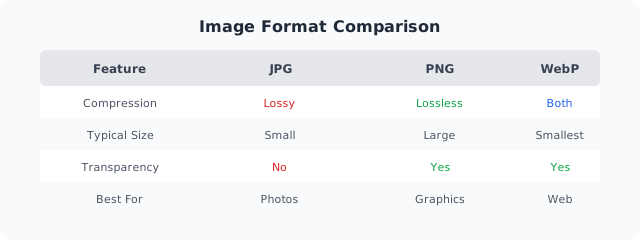 Quick reference: JPG for photos, PNG for graphics, WebP for the best of both worlds.
When to Choose JPG
Use JPG for photographs, product images, and any image where file size matters more than pixel-perfect accuracy. Social media photos, website backgrounds, and e-commerce product shots are all excellent candidates for JPG. The format’s efficient compression means faster loading and lower bandwidth usage without sacrificing perceived quality.
When to Choose PNG
Use PNG for screenshots, user interface elements, logos, icons, and any graphic with text. When you need transparency — whether it’s a logo on a colored background or a complex image with soft edges — PNG is your only practical choice among the universal formats. PNG is also preferable when you plan to edit an image multiple times, as repeated saves don’t degrade quality.
The Hybrid Approach
Most professional workflows use both formats. Export photographs as JPG at appropriate quality settings, and save UI elements, icons, and logos as PNG. This hybrid approach gives you the smallest possible file sizes for photo content while preserving the precision needed for graphics. For modern web projects, consider WebP as a third option that combines the best aspects of both formats.